
Laptop microphones have become a necessity for many people, especially those who work from home or participate in online meetings or classes. Laptop microphones are designed to offer better sound quality and clarity when compared to the built-in microphones that come with most laptops. These external microphones come in different types and sizes, and they offer various features to suit different needs.
When looking for the best laptop microphones, there are several things to consider. The first thing to consider is the type of microphone. There are many types of microphones, including condenser, dynamic, and USB microphones. The type of microphone you choose will depend on your needs and preferences. You should also consider the size of the microphone, as well as its compatibility with your laptop.
Another critical factor to consider when purchasing a laptop microphone is its sound quality. A high-quality microphone should offer clear and crisp sound, without any background noise or distortion. Additionally, you should consider the microphone’s ease of use, portability, and durability.
In this article, we have tested and reviewed some of the best laptop microphones on the market. We have considered various factors, including sound quality, ease of use, compatibility, and price. Whether you are a professional or a student, our review will help you find the perfect microphone for your needs.
Best Laptop Microphones
If you’re working from home or attending virtual meetings, having a high-quality microphone for your laptop is essential. A good microphone can make a huge difference in the clarity and quality of your audio, making it easier for you to communicate with others and present your ideas effectively. In this article, we’ve rounded up the best laptop microphones on the market, so you can find the perfect one for your needs.
JOUNIVO USB Microphone

If you’re looking for an affordable and easy-to-use microphone for your laptop, the JOUNIVO USB Microphone is a great choice.
Pros
- The 360-degree gooseneck design allows you to position the microphone exactly where you need it, ensuring the best possible sound quality for your recordings or video calls.
- The mute button and LED indicator make it easy to mute and unmute the microphone, and the indicator lets you know when the microphone is in use.
- The intelligent noise-canceling technology ensures that your voice comes through loud and clear, even in noisy environments.
Cons
- Some users have reported that the microphone picks up background noise, which can be distracting during recordings or video calls.
- The microphone may not be as durable as some higher-end models, so it may not last as long with heavy use.
- The USB cable is only 6 feet long, which may not be long enough for some users who need to position the microphone farther away from their laptop.
The JOUNIVO USB Microphone is a solid choice for anyone who needs an affordable and easy-to-use microphone for their laptop. The 360-degree gooseneck design allows you to position the microphone exactly where you need it, while the mute button and LED indicator make it easy to use. The intelligent noise-canceling technology ensures that your voice comes through loud and clear, even in noisy environments.
However, some users have reported that the microphone picks up background noise, which can be distracting during recordings or video calls. Additionally, the microphone may not be as durable as some higher-end models, so it may not last as long with heavy use. Finally, the USB cable is only 6 feet long, which may not be long enough for some users who need to position the microphone farther away from their laptop.
Overall, if you’re looking for an affordable and easy-to-use microphone for your laptop, the JOUNIVO USB Microphone is definitely worth considering. Just be aware of its limitations and make sure it meets your needs before making a purchase.
C G CHANGEEK Mini USB Microphone

If you’re looking for an affordable and compact microphone for your laptop or desktop computer, the C G CHANGEEK Mini USB Microphone is definitely worth considering.
Pros
- Clear sound for video tutorials, online classes, and video calls
- Omnidirectional polar pattern captures crystal-clear audio equally from all sides
- Plug and play with built-in USB sound card
Cons
- Some customers complained the gooseneck was too soft that could not hold the shape
- USB hub or USB extension cable not included
- Not as good as a dedicated microphone for Dragon dictations
The C G CHANGEEK Mini USB Microphone is perfect for those who need to talk closely and clearly during video tutorials, online classes, and video calls. Its omnidirectional polar pattern captures crystal-clear audio equally from all sides, making it ideal for recording audio for your webinars, vlogs, tutorials, and more. Installation is a breeze with its built-in USB sound card, which is compatible with all PC (Windows system) and MAC (MacOS) computers, and also works via USB hub. The microphone’s 360 degree adjustable gooseneck can be shaped as you want to put the microphone in an ideal position.
The microphone is extremely light (43g) and very small, so you can put it in the computer carrying bag. Made of metal and engineering resin, it is durable and comes with a 1-year warranty. However, some customers complained the gooseneck was too soft that could not hold the shape. Also, a USB hub or USB extension cable is not included. Finally, it’s not as good as a dedicated microphone for Dragon dictations.
Overall, the C G CHANGEEK Mini USB Microphone is a great option for those who need an affordable and compact microphone for their laptop or desktop computer.
AUDIOPRO USB Microphone

If you’re looking for a high-quality microphone that’s easy to set up and use, the AUDIOPRO USB Microphone is a great choice.
Pros
- The microphone is plug-and-play, so you can start using it right away without any extra software or drivers.
- The onboard audio controls make it easy to adjust the volume and mic gain to get the perfect sound.
- The cardioid pickup pattern ensures that your voice comes through loud and clear while minimizing background noise.
Cons
- Some users have reported that the LED light indicating the mute functionality is too bright and distracting.
- The microphone may not be compatible with all devices, so be sure to check before you buy.
- The included pop filter may not be as effective as some users would like.
The AUDIOPRO USB Microphone is a versatile and high-quality microphone that’s perfect for streaming, gaming, podcasting, and more. With plug-and-play functionality, onboard audio controls, and a cardioid pickup pattern, you can be sure that your voice will sound great and unwanted background noise will be minimized. However, some users have reported issues with the LED light and compatibility with certain devices, so be sure to check before you buy. Despite these minor drawbacks, the AUDIOPRO USB Microphone is a great choice for anyone looking for a high-quality microphone that’s easy to use and provides excellent sound quality.
CMTECK USB Computer Microphone

If you’re looking for an affordable and easy-to-use microphone for your laptop, the CMTECK USB Computer Microphone is a great choice.
Pros
- The built-in high-performance CMTECK CCS2.0 SMART CHIP effectively blocks background noise, ensuring smooth recording and clear sound quality for podcasting, chatting, and recording vocals.
- The compact design with an adjustable neck makes it convenient to use and suitable for various purposes, including podcasting, YouTube, Twitch, Skype, FaceTime, and gaming.
- The USB Plug&Play feature allows hassle-free installation, and it’s well compatible with Windows, Mac OS, and PS4.
Cons
- It’s not compatible with Raspberry Pi/Android devices.
- The mute button with LED indicator may be too sensitive, and it’s easy to accidentally mute the microphone.
- The blue LED light may be distracting and unnecessary for some users.
Overall, the CMTECK USB Computer Microphone is a reliable and budget-friendly option for those who need a microphone for their laptop. The sound quality is impressive, and the plug-and-play feature makes it easy to set up and use. However, the compatibility issue and sensitivity of the mute button may be a concern for some users.
Perrycom USB Computer Microphone

If you’re looking for an affordable and easy-to-use USB microphone for your computer, the Perrycom USB Computer Microphone is a solid option.
Pros
- The 360-degree position adjustable gooseneck design allows you to pick up sound from any direction with high sensitivity, making it ideal for recording, gaming, and voice dictation.
- The microphone features noise-canceling technology that picks up clear sound and reduces background noise, ensuring that your voice comes through loud and clear.
- The one-click power on/off and mute/unmute buttons with LED indicator make it easy to control the microphone and know when it’s in use.
Cons
- The microphone is not compatible with Linux or Android operating systems.
- The mute button is not as quick as some users would like.
- Some users have reported that the microphone is larger than they expected.
The Perrycom USB Computer Microphone is a great choice for anyone looking for an affordable and easy-to-use USB microphone for their computer. The 360-degree position adjustable gooseneck design allows you to pick up sound from any direction with high sensitivity, making it ideal for recording, gaming, and voice dictation. The microphone also features noise-canceling technology that picks up clear sound and reduces background noise, ensuring that your voice comes through loud and clear. The one-click power on/off and mute/unmute buttons with LED indicator make it easy to control the microphone and know when it’s in use.
While the microphone is not compatible with Linux or Android operating systems, it is plug-and-play compatible with Windows (7, 8, and 10) and Mac OS. Some users have reported that the mute button is not as quick as they would like, and others have noted that the microphone is larger than they expected. However, these minor drawbacks are outweighed by the microphone’s affordability and ease of use.
Logitech for Creators Blue Yeti USB Microphone

If you’re looking for a high-quality USB microphone for recording, streaming, podcasting, or any other audio application, the Logitech for Creators Blue Yeti USB Microphone is an excellent choice. With advanced Blue VO!CE software and four pickup patterns, this microphone offers incredible flexibility and professional-level sound quality.
Pros
- Custom three-capsule array for clear, powerful, broadcast-quality sound
- Blue VOICE software for enhanced broadcast vocal effects, advanced voice modulation, and HD audio samples
- Four pickup patterns for flexible recording and streaming options
Cons
- Some users have reported issues with feedback or background noise
- The microphone is relatively large and heavy, which may be a consideration for some users
- The price point is higher than some other USB microphones on the market
The Logitech for Creators Blue Yeti USB Microphone is an excellent choice for anyone looking for a high-quality USB microphone with advanced features and professional-level sound quality. With four pickup patterns and advanced Blue VO!CE software, this microphone offers incredible flexibility for recording, streaming, podcasting, and more. However, some users have reported issues with feedback or background noise, and the microphone’s size and weight may be a consideration for some users. Overall, if you’re looking for a top-of-the-line USB microphone, the Logitech for Creators Blue Yeti is definitely worth considering.
TKGOU Conference USB Microphone

If you’re looking for a reliable and affordable microphone to improve your online meetings and recordings, the TKGOU Conference USB Microphone is a great option.
Pros
- Crystal clear voice capturing with 360° sensitivity pickup range
- Easy to transport and compact design
- Sturdy and durable metal material construction
Cons
- Not compatible with Raspberry Pi/Linux/Android/Xbox
- No gain control
- No mute button
The TKGOU Conference USB Microphone is a great solution for anyone who needs to make video meetings and distance education. With its multi-purpose use, you can use it for one-to-one and small-group conference calls, online chatting, recording podcasts, YouTube videos, or streaming on Twitch.
The USB plug & play design makes it easy to install, just plug it into your laptop/desktop and get started. The built-in indicator light informs the status (blue: working, no light: mute), and it’s well compatible with Windows and Mac.
The outstanding sound quality offers crystal clear voice capturing on meetings calls with 360° sensitivity pickup range, which is 10 times better than traditional computer microphones. The microphone is constructed of sturdy and durable metal material, and the base is fitted with an anti-slip mat which keeps it stable on the desktop during use.
The portable design makes the microphone take up less space, and you can put it in your pocket or briefcase and take it wherever you want. The cable length is 78 inches (2 meters), radius: 2.75 inches (7cm), thickness: 0.59 inches (15mm), and weight: 0.26 lb (120g).
In conclusion, if you’re looking for a reliable and affordable microphone to improve your online meetings and recordings, the TKGOU Conference USB Microphone is a great option that offers outstanding sound quality and easy portability.
TONOR USB Microphone
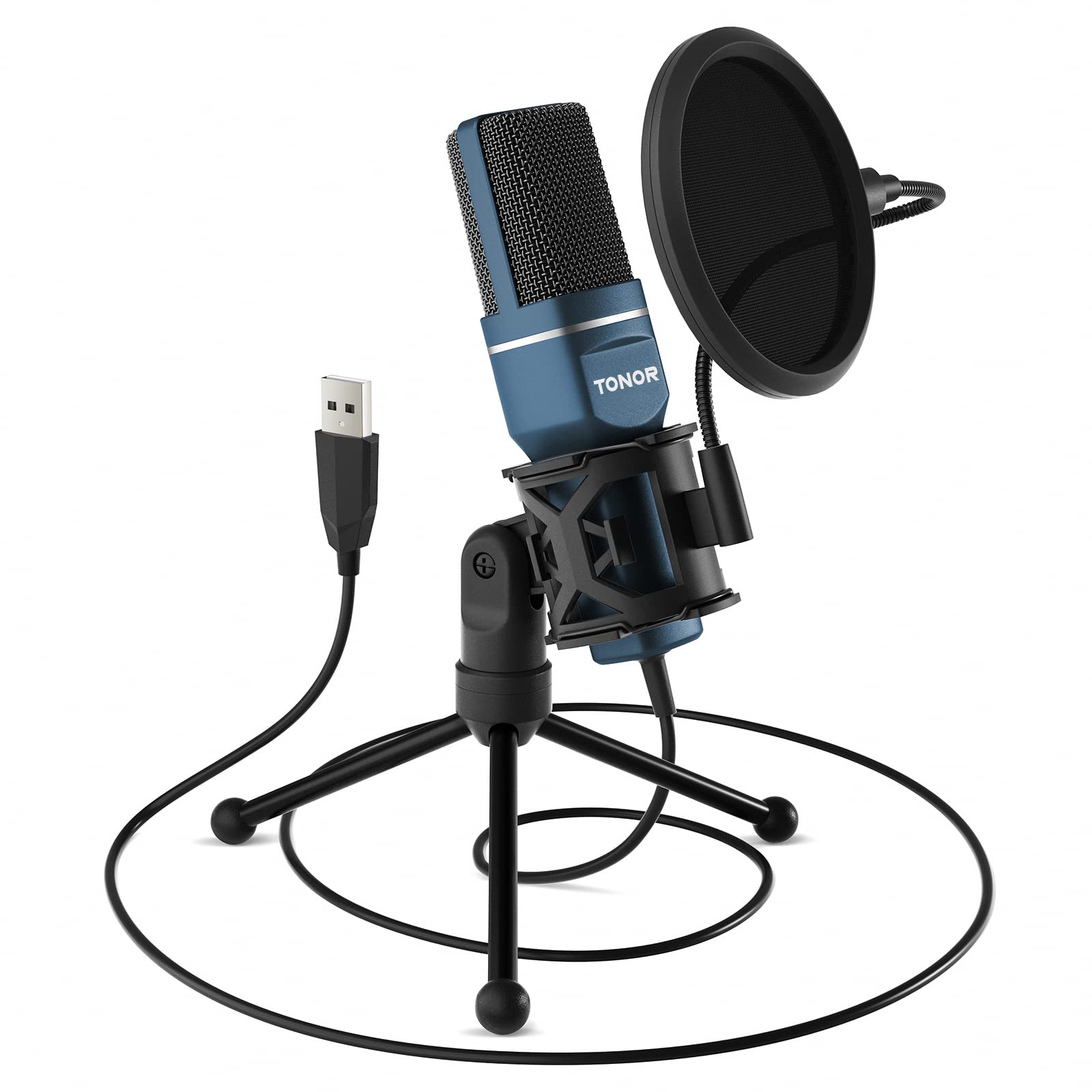
If you’re looking for an affordable and easy-to-use microphone for streaming, podcasting, or recording, the TONOR USB Microphone is a great option.
Pros
- The microphone is plug-and-play with a USB 2.0 data port, so you don’t need to install any additional drivers.
- The cardioid pickup pattern captures clear, smooth, and crisp sound in front of the microphone while suppressing unwanted background noise.
- The microphone is easy to install and comes with a foldable tripod, mini shock mount, and pop filter.
Cons
- The shock mount may need to be unscrewed and attached to a boom stand with a 5/8” threaded insert directly, which may require additional equipment.
- The microphone is not compatible with Xbox.
- Some users have reported feedback in the background of the microphone.
The TONOR USB Microphone is a versatile and affordable option for anyone looking to improve their audio quality. With its plug-and-play functionality, cardioid pickup pattern, and easy installation, it’s a great choice for streaming, podcasting, and recording. However, some users have reported feedback in the background of the microphone, and the shock mount may require additional equipment to attach to a boom stand. Overall, if you’re looking for a budget-friendly microphone that delivers great sound quality, the TONOR USB Microphone is definitely worth considering.
PALADOU 3.5MM PC Microphone

If you’re in the market for an affordable and easy-to-use microphone for your laptop or PC, the PALADOU 3.5MM PC Microphone might be worth considering.
Pros
- High definition audio for clear sound quality
- Plug-and-play 3.5mm jack for easy setup
- 360-degree adjustable gooseneck for comfortable positioning
Cons
- May not be suitable for professional recording
- Some users have reported compatibility issues with certain devices
- No additional features such as mute button or volume control
This microphone is ideal for casual use, such as video conferencing, gaming, and voice recording. The high-definition audio ensures clear sound quality, and the plug-and-play 3.5mm jack makes it easy to set up without the need for any additional software or drivers. The 360-degree adjustable gooseneck also makes it easy to find a comfortable position for the microphone.
However, if you’re looking for a microphone for professional recording or streaming, this may not be the best option. Some users have also reported compatibility issues with certain devices, so it’s important to ensure that your device is compatible before purchasing. Additionally, the PALADOU 3.5MM PC Microphone does not come with any additional features such as a mute button or volume control.
Overall, the PALADOU 3.5MM PC Microphone is a solid choice for those in need of an affordable and easy-to-use microphone for casual use.
Uniwit Mini Portable Vocal/Instrument Microphone

If you’re looking for a budget-friendly microphone for your laptop or mobile device, the Uniwit Mini Portable Vocal/Instrument Microphone is a decent option.
Pros
- Small and portable
- Compatible with a variety of devices
- Easy to use
Cons
- May require an adapter for some devices
- Sound quality is average
- Cord is relatively short
This microphone is a great option if you need something small and portable that you can take with you on the go. It’s easy to use and doesn’t require any external power source, making it a convenient choice for recording voiceovers or podcasts.
However, keep in mind that the sound quality is average at best, so if you’re looking for a microphone that will provide crystal clear audio, you may want to consider investing in a higher-end model. Additionally, some devices may require an adapter in order to use this microphone, which can be an inconvenience.
Overall, the Uniwit Mini Portable Vocal/Instrument Microphone is a decent choice for those on a budget who need a basic microphone for their laptop or mobile device. However, if you’re serious about recording high-quality audio, you may want to consider investing in a more expensive option.
Buying Guide
When it comes to choosing the best laptop microphone, there are a few key features to consider. Here are some important factors to keep in mind:
Microphone Type
There are two main types of laptop microphones: built-in and external. Built-in microphones are typically less expensive and more convenient, but they may not provide the best sound quality. External microphones, on the other hand, can offer higher-quality audio, but they may be more expensive and require additional setup.
Microphone Directionality
Microphone directionality refers to how the microphone picks up sound. There are three main types of microphone directionality: omnidirectional, cardioid, and bidirectional. Omnidirectional microphones pick up sound from all directions, while cardioid microphones pick up sound primarily from the front and bidirectional microphones pick up sound from the front and back. The type of directionality you choose will depend on your specific needs.
Frequency Response
Frequency response refers to the range of frequencies that a microphone can pick up. A wider frequency response generally means that the microphone can capture a wider range of sounds, which can be important for recording music or other types of audio.
Sensitivity
Microphone sensitivity refers to how well a microphone can pick up quiet sounds. A more sensitive microphone may be better for recording quieter instruments or voices, while a less sensitive microphone may be better for recording louder sounds.
Connectivity
Finally, consider how the microphone connects to your laptop. Some microphones connect via USB, while others use a 3.5mm jack. USB microphones may offer better sound quality, but they may also be more expensive. 3.5mm microphones are generally less expensive, but they may not provide the best sound quality.
By considering these factors, you can choose the best laptop microphone for your needs.

Aaron Smith is a frequent contributor to Singers Room. Since 2005, Singersroom has been the voice of R&B around the world. Connect with us via social media below.